Local SEO
 Social Media
 Web Development
 Content Writing
 Web-hosting
On-Page SEO: A Complete Guide to Getting It Right
People expect quick and precise results when they use Google. You have a far better chance of getting their attention if your website is on the top page. However, how does one get that coveted position? On-page SEO the areas of your website that you have direct control over is one of the most dependable methods.
Consider it similar to operating a Main Street business. Bright lighting, clever product displays, and well-placed signs are all examples of on-page SEO. It’s the effort you make to ensure that guests stay, browse, and eventually make a purchase.
Regardless of how much promotion or word-of-mouth you have to draw visitors to your site, they will not remain if they have a bad experience.
The essential components of on-page SEO, typical blunders to steer clear of, and tactics to create a website that both search engines and actual users will enjoy are all covered in this post.
1. First off, what is on-page SEO?
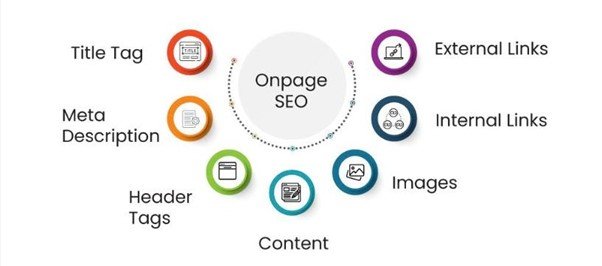
Optimizing individual web pages to rank better and draw in more relevant traffic is known as on-page SEO. It contains the HTML source code as well as the content you post.- In a nutshell, on-page SEO refers to the text, graphics, internal links, meta descriptions, titles, and other elements on your own website.
- What occurs outside of your website, such as backlinks, mentions, and reputation, is known as off-page SEO.
- The infrastructure page speed, indexing, mobile friendliness, and security is the focus of technical SEO.
2. On-page SEO’s Fundamental Components
a) Title Tags: Your Initial Impact
The blue, clickable headline that appears in Google search results is called a title tag. It frequently catches a prospective visitor’s attention right away.- To avoid being cut off, keep it within 60 characters.
- Put your primary keyword close to the start.
- Make it friendly and unambiguous.
b) Meta Descriptions: Your Page’s Ad Copy
In search results, meta descriptions are brief explanations that appear beneath the title. They have an impact on click-through rates even if they have no direct effect on rankings.- Don’t exceed 160 characters.
- Use phrases that convey activity, such as “discover,” “learn,” “find,” or “call today.”
- correspond to the search’s purpose.
- Take Johnson Plumbing
c) Headings (H1, H2, H3): Content Organization
- For the primary theme, use one H1 every page.
- For significant portions, use H2s; for subsections, use H3s.
- Incorporate keywords organically.
d) Content Keywords: Using the Language of Your Audience
The link between what people search for and what you have to offer is provided by keywords. However, how you utilize them is important.- Include keywords in the first 100 words in a natural way.
- To seem natural, use synonyms and variants.
e) Image Optimization: Making Your Photos Visible to Google
Images are essentially invisible to search engines. They depend on the information you provide them.- Make sure your alt text adequately explains the image.
- Images should be compressed to avoid slowing down your website.
3. Content’s Function in On-Page SEO
Producing Information That Provides Answers Search intent should be reflected in your content. Typically, people search with one of three goals in mind:- Informational: attempting to find out something new (“how to fix a leaky faucet”).
- Navigational: searching for a particular website, such as the “Home Depot website.”
- Transactional: prepared to take action (“local emergency plumber”).
4. Comparing Long-Form with Short-Form Content
Because it goes deeper into a subject, longer content frequently performs better. However, 2,000 words is not necessary for every page.- Tutorials, guidelines, and blog entries should be thorough.
- Clear and succinct product and service pages are essential.
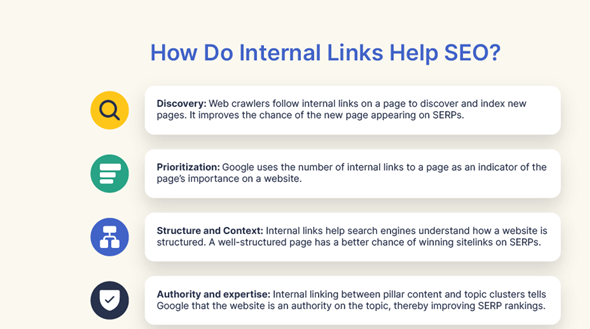
5. Linking Internally: Joining the Dots
Internal links aid search engines in crawling your website and direct users to similar sites.- Best practices:
- Make a natural connection inside the content.
- Instead of using “click here,” use “see our plumbing repair guide” as the descriptive anchor text.
- Aim for no more than three to five internal links per piece.
6. Experience of the User: Design and SEO Come Together
Page Layout and Speed
A website that loads slowly irritates users. Many will depart if it takes more than a few seconds.- Reduce the size of the photographs.
- Turn on browser caching.
- Eliminate any extraneous code.
Mobile-Friendliness
Mobile devices currently account for over half of all web traffic. You will lose consumers and ranks if your website is not mobile-friendly.- Make use of responsive design.
- Test your website on a range of devices.
- Make sure menus and buttons are simple to faucet.
Readability
Simple, unambiguous language is a hallmark of good SEO writing.- Make use of bullet points and brief paragraphs.
- Use graphics and headlines to break up the content.
- A conversational tone is what you want.
AmericanSEOAgency’s Approach to On-Page SEO
We at American SEO Agency are aware that minor adjustments can have a significant impact. Our goal is to assist companies in developing web pages that rank and convert, from title tags and internal linking to full-page audits. Consider us to be your SEO pit team. We ensure sure your website is operating quickly, looking great, and generating consistent traffic while you concentrate on managing the company.